Active Directory Reporting Made Simple
Run complex SOX auditing reports for both on-premises Active Directory and Azure Entra ID in as little as 2 clicks. Over 400 predefined reports, built-in scheduling, and effortless exports.
Free 14-day trial — $50 off when you purchase


Trusted by IT teams at leading organizations


Everything You Need for AD Reporting
Powerful, reliable, and enterprise-ready tools to audit, report, and manage your Active Directory environment.
Dated PDF or Excel evidence for any period — what ran, coverage against PCI-DSS, SOC 2, ISO 27001, HIPAA and NIST 800-53, and what changed.
Read the guideYour domain scored out of 100 across seven measures — with the finding and the report behind every point.
Read the guideEvery account's life at a glance — created, password set, last logon and expiry, in order with today marked.
Read the guideFolder and file permission reporting against local or UNC paths — no domain required. Orphaned SIDs, open access, broken inheritance, and folder owners.
Read the guide17 premium Entra ID reports — sign-in & audit logs, risky sign-ins, weak/no MFA, conditional access hygiene, and PIM activity, each labeled [P1] or [P2].
See the reportsSave any report as a baseline and compare it later — instant Added / Removed / Changed diff for every AD and Azure report.
Read the guideCross-reference on-prem AD with your Entra tenant — cloud-only admins, sync gaps, immutableID conflicts, UPN mismatches.
Read the guideRight-click any report and pin it to a per-domain ★ Favorites group at the top of the tree — one-click access to your daily set.
Read the guideLive overview of your AD environment — password health, privileged accounts, security alerts, DC status, and Azure sync at a glance.
Read the guideOver 400 predefined reports for Users, Groups, OUs, Computers, and GPOs — run any report in seconds.
See the reportsComprehensive Microsoft Entra ID user reports with OData filters and Microsoft Graph API integration.
Read the guideAutomate report generation daily, weekly, or monthly with the built-in scheduler and Windows service.
Read the guideExport any report to your preferred format for sharing, compliance documentation, and archiving.
Read the guideAudit user permissions, group memberships, and security configurations to maintain a secure environment.
See the reportsBuild complex LDAP queries visually without memorizing syntax — create custom reports in minutes.
Read the guideBatch auditing with parallel execution, 9 built-in profiles including PCI-DSS Quarterly and SOC 2 Annual, scheduling, and multi-sheet Excel export.
Read the guideRun scheduled reports as a background Windows service — no need to keep the application open for continuous, unattended delivery.
Read the guideConnect to multiple AD domains and trusted forests, each with custom credentials, and manage them all from a single interface.
Read the guideRun It Once, Then Let It Run Itself
Pick a capability to see what it does — click the screenshot to enlarge.
Real-Time Dashboard
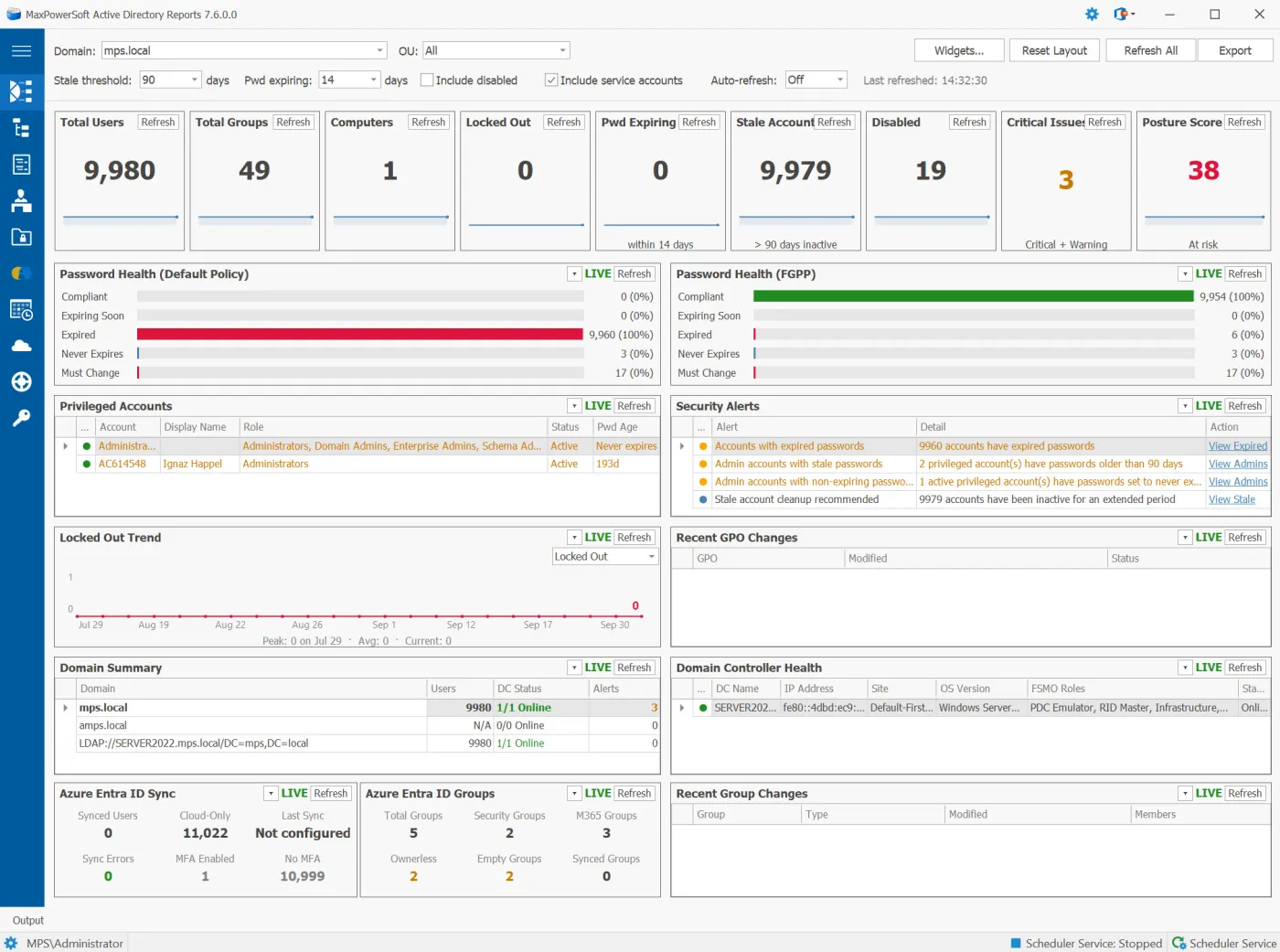
A live view of your Active Directory and Azure Entra ID environment — key figures, password health, privileged accounts, security alerts, domain controller health and Azure sync. The Security Posture Score rates your domain out of 100 across seven measures, and every widget clicks through to the report behind it.
Built-in Scheduler
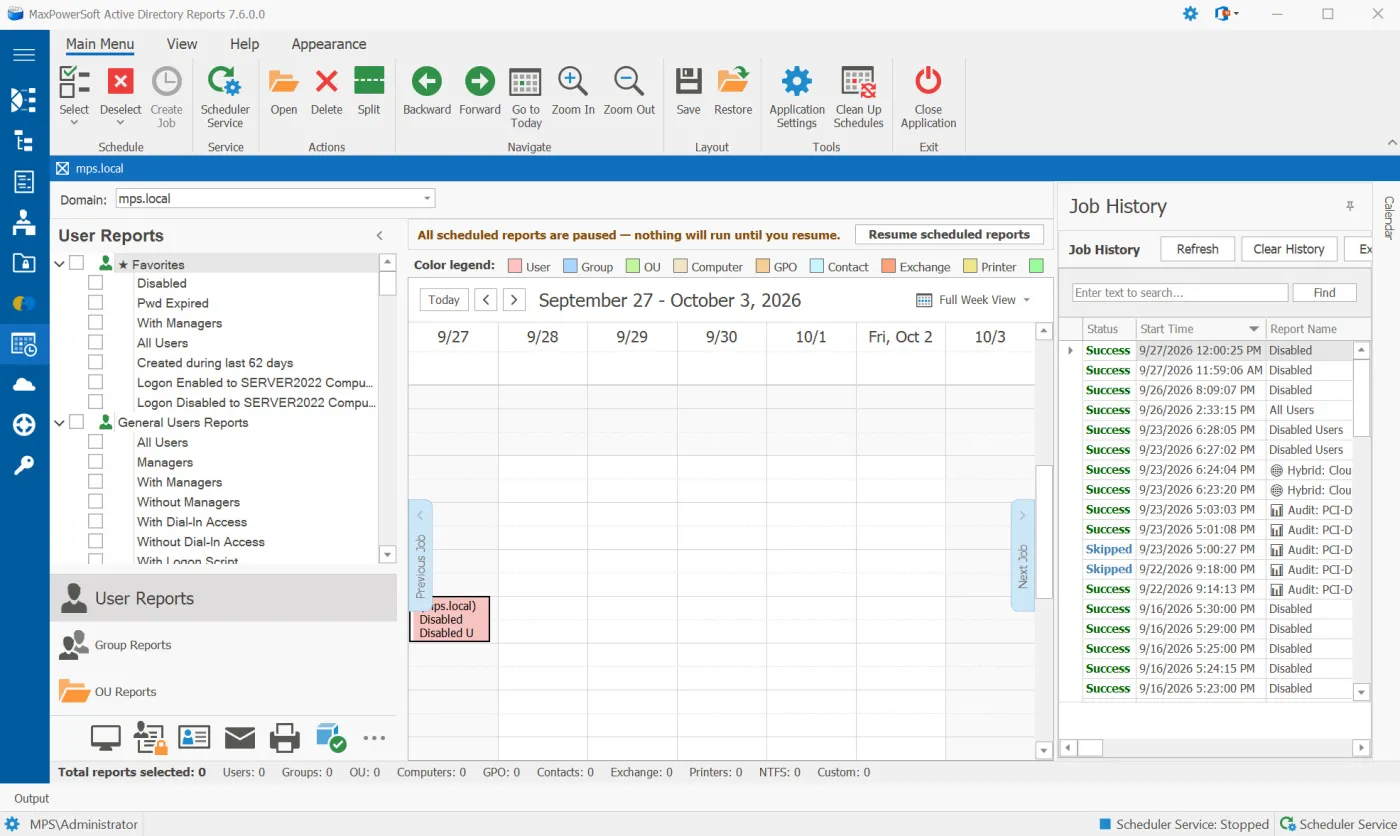
Schedule any AD or Azure report, audit profile or hybrid identity view to run once, daily, weekly or monthly — exported to a folder and emailed to the people who need it. The Scheduler Service runs as a Windows service, so jobs run whether or not AD Reports is open, and Job History records every run.
Change-Aware Emails & Alerts
A scheduled report can email what changed since its last run — an added / removed / changed summary, with the full change list attached as Excel. Set your own threshold alerts on locked-out accounts, stale accounts, expired passwords and offline DCs, and a daily status email confirms that every job ran.

Report History & Compare
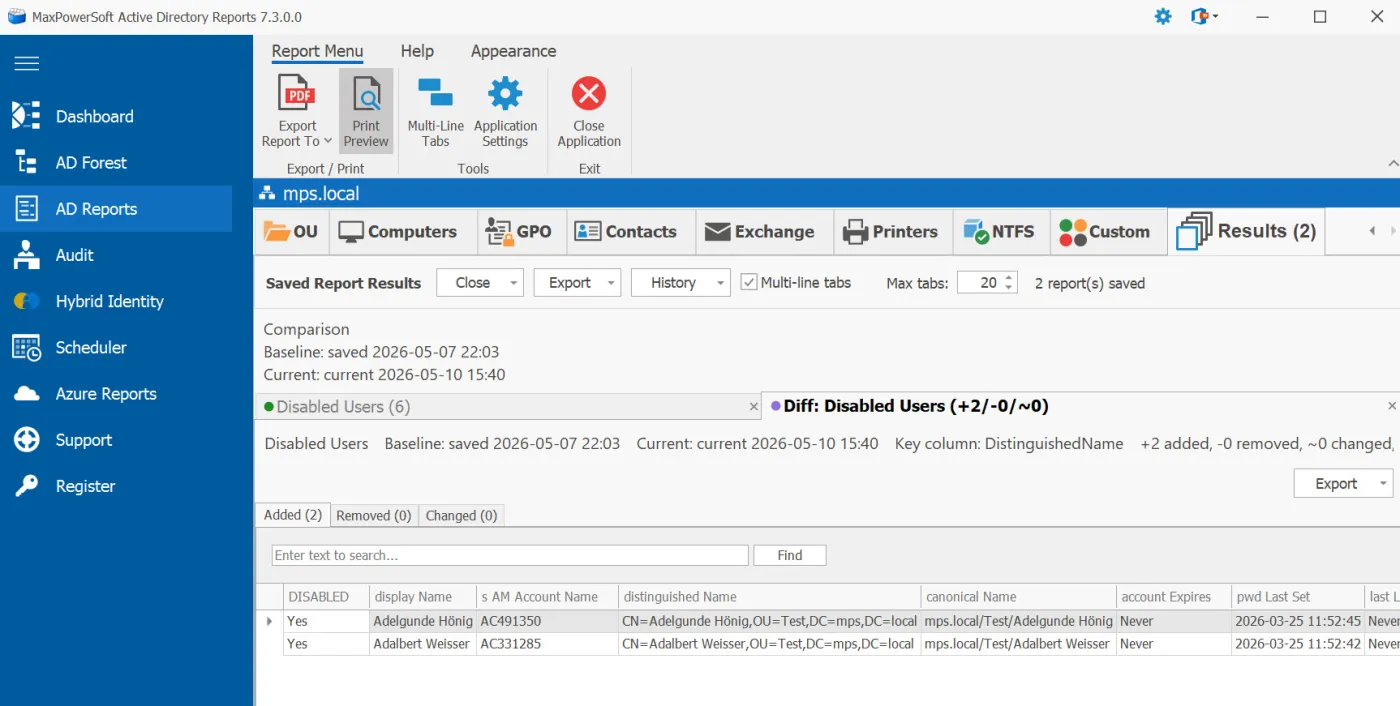
Save any AD or Azure report as a baseline and compare it later. The Diff tab splits the result into Added, Removed and Changed, with side-by-side (was) and (now) columns, and snapshots persist across restarts — compare today against last week, last month or your last security audit.
Audit Module
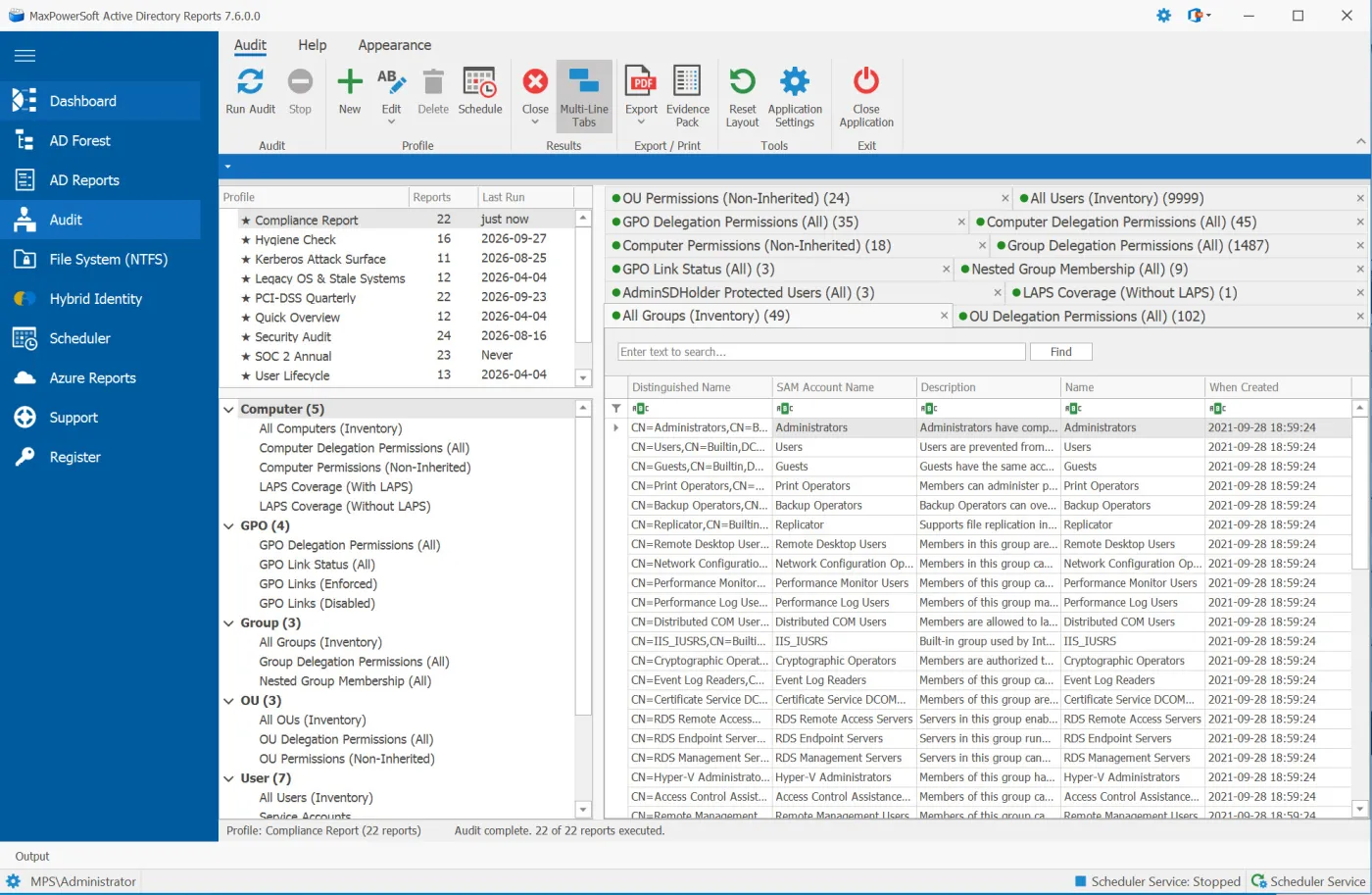
Run a whole audit in one go: pick one of nine built-in profiles — including PCI-DSS Quarterly and SOC 2 Annual — or build your own, and up to four reports run in parallel. Schedule a profile for multi-sheet Excel export and an HTML email summary; its scheduled runs feed the Compliance Evidence Pack.
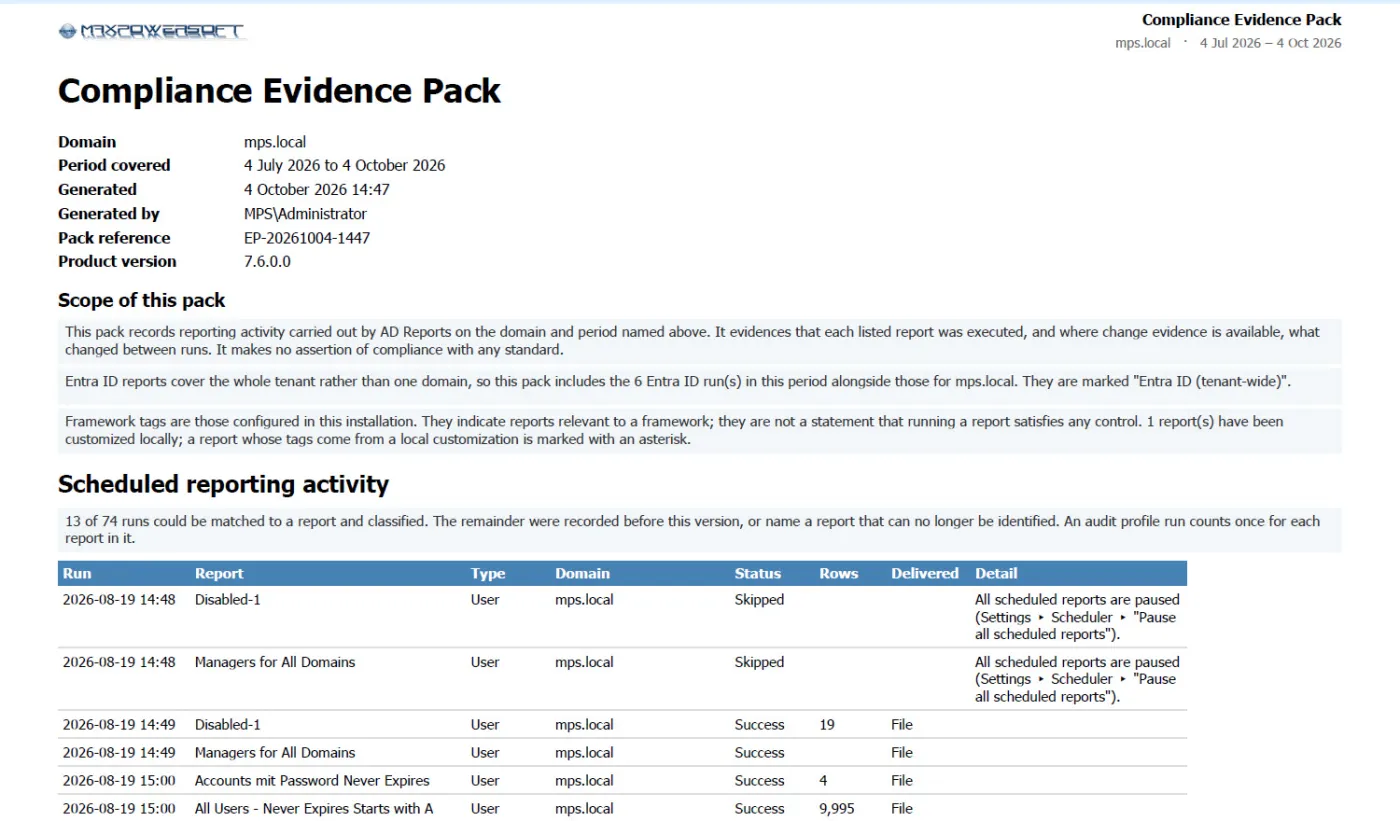
Compliance Evidence Pack
Give your auditor dated evidence, not screenshots. One click on the Audit ribbon builds a PDF or Excel pack for any period: every scheduled report that ran and whether it was delivered, coverage against PCI-DSS, SOC 2, ISO 27001, HIPAA and NIST 800-53, and what changed between runs.
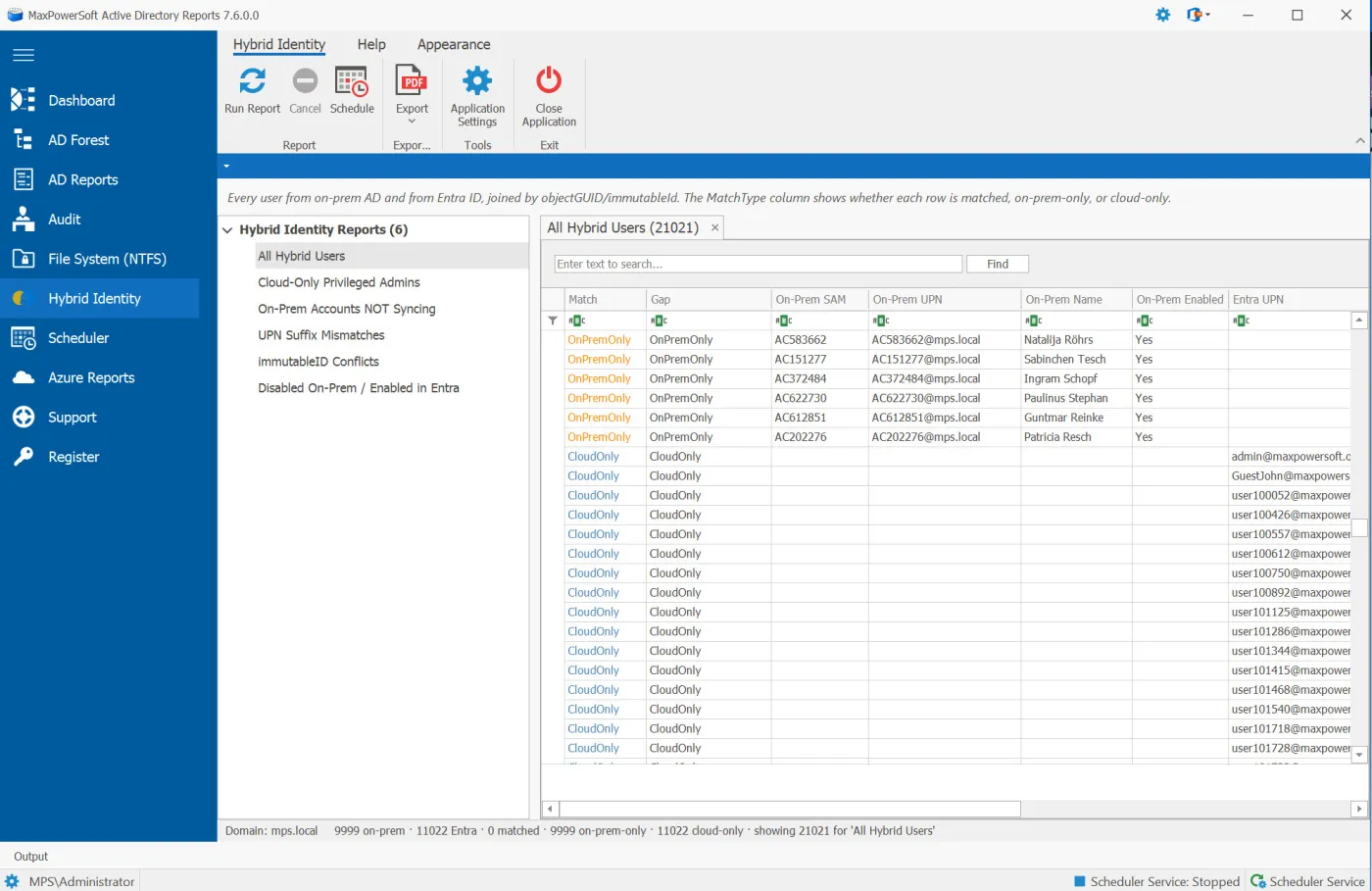
Hybrid Identity Gap Analysis
Cross-reference on-prem Active Directory with your Entra ID tenant and surface the mismatches. Six ready-made views — including Cloud-Only Privileged Admins, On-Prem Accounts NOT Syncing, UPN Suffix Mismatches and immutableID Conflicts — with color-coded match status, and any view can be scheduled for email delivery.
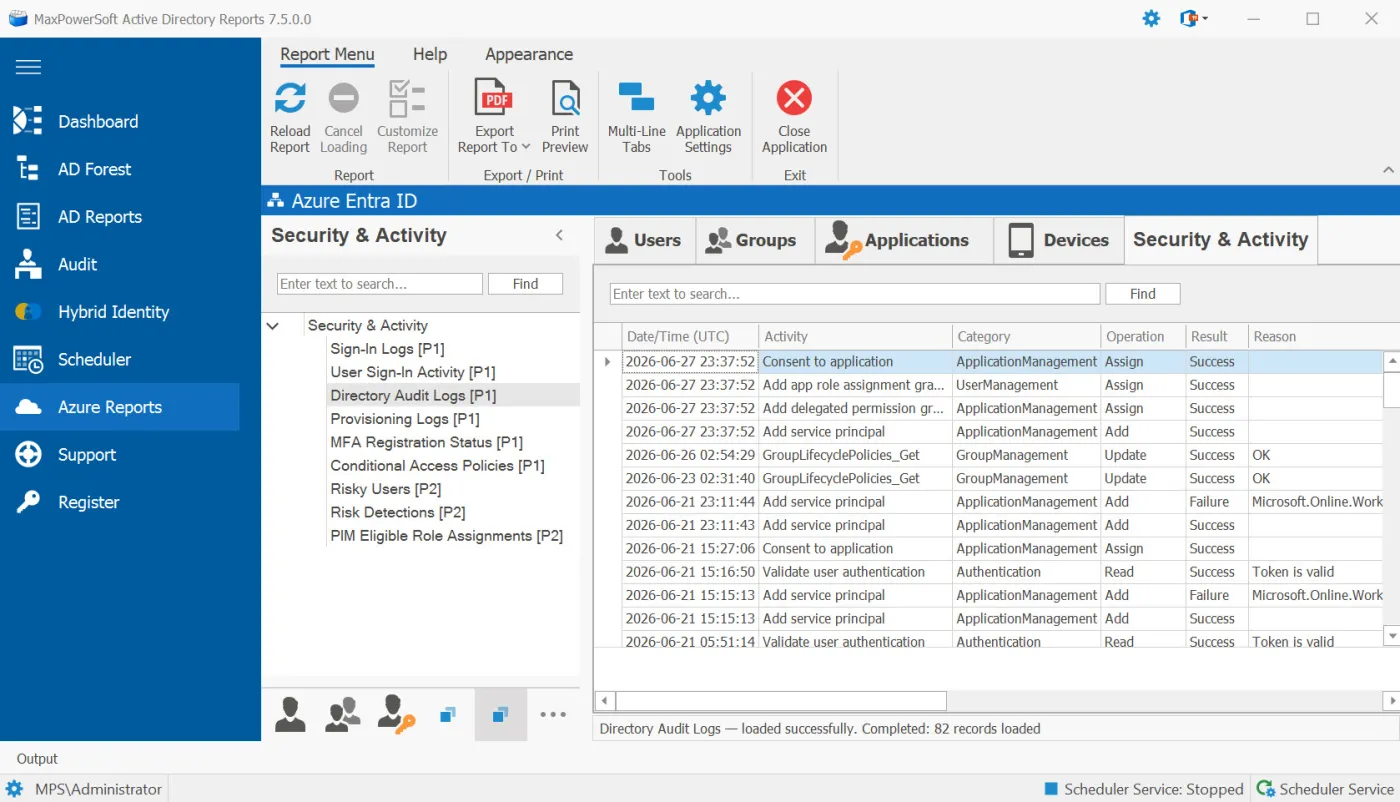
Azure Security & Activity Reports
Seventeen premium Entra ID reports in one tab — sign-in and audit logs, risky sign-ins, legacy authentication, weak or no MFA, conditional access hygiene, and PIM eligibility and activity. Each is labeled [P1] or [P2] for the Entra license it needs, and premium consent is requested only when you run one.
Powerful Features, In Detail
Designed for IT professionals who need reliable, automated Active Directory reporting.
Compliance Evidence Pack New
One click on the Audit ribbon builds a dated PDF or Excel evidence pack for any period — what ran and whether it was delivered, coverage against PCI-DSS, SOC 2, ISO 27001, HIPAA and NIST 800-53 including the reports that did not run, and what changed between runs. Ready-made PCI-DSS Quarterly and SOC 2 Annual audit profiles get you started.
Build a Compliance Evidence Pack
Security Posture Score New
A Dashboard tile scores your domain out of 100 across seven measures — privileged passwords, KRBTGT password age, inactive accounts, disabled accounts in privileged groups, and password expiry — and bands it Strong, Good, Fair or At risk. Click through to the finding and the report behind every point.
Security Posture Score
Schedule Any Azure Report
All 43 Azure reports can now run on a schedule — Users, Groups, Applications & Access, Devices, and Security & Activity. Run a report, click Schedule, and it runs once, daily, weekly or monthly, exports to Excel and emails itself. Scheduled runs work whether or not the application is open, and never prompt for sign-in.
Scheduling Azure Reports
Azure Security & Activity Reports
Seventeen premium Entra ID reports in one tab — sign-in and audit logs, risky sign-ins, legacy authentication, weak/no MFA, MFA enforcement coverage, conditional access hygiene, and full PIM eligibility, activity, and history. Each is labeled [P1] or [P2] so you know which Entra license it needs, and premium consent is requested only when you run the report — your free-tier reports are never affected.
Azure Security & Activity Reports
Change-Aware Emails & Proactive Alerts
Scheduled reports can email what changed since the last run — an added / removed / changed summary with the full list attached as Excel. Set your own threshold alerts on locked-out accounts, stale accounts, expired passwords, and offline DCs, a daily scheduler status email confirms every job ran, and an in-app license expiry reminder warns you before your license lapses.
Scheduling & Monitoring
Report History & Compare
Save any AD or Azure report as a baseline and compare it later. The new Diff
tab shows three sub-tabs — Added, Removed, and Changed —
with side-by-side (was) and (now) columns. Snapshots persist across
restarts so you can compare today's results against last week, last month, or your last
security audit.

Hybrid Identity Gap Analysis
Cross-references your on-prem Active Directory with your Entra ID (Azure AD) tenant and surfaces the mismatches. Six pre-built views: All Hybrid Users, Cloud-Only Privileged Admins, On-Prem Accounts NOT Syncing, UPN Suffix Mismatches, immutableID Conflicts, and Disabled On-Prem / Enabled in Entra. Color-coded match status, header summary counts, and timestamped CSV / Excel exports. Schedule any view for daily, weekly, or monthly email delivery.
Hybrid Identity Gap Analysis
Real-Time Dashboard
Get a live, at-a-glance overview of your entire Active Directory and Azure Entra ID environment — key figures, the Security Posture Score, password health, privileged accounts, security alerts, domain controller health, a 90-day trend of any key figure, and Azure Entra ID sync status. Choose which widgets to show, with auto-refresh and one-click drill-down.
How to Use the Dashboard
Selection of Predefined Reports
AD Reports offers over 400 predefined reports encompassing a broad spectrum of Active Directory components, including Users, Groups, Organizational Units, and more. These reports deliver instant insights into your Active Directory environment, allowing for customization and creation of new, tailored reports to meet specific informational needs.
Report Library
Azure Entra ID Reporting
Generate comprehensive reports for your Azure Entra ID (formerly Azure Active Directory) users. Access pre-built user reports including All Users, Enabled Users, Disabled Users, Admins, and Guest Users. Create custom reports with advanced OData filters, select specific properties, and configure report layouts to match your exact requirements. Seamlessly authenticate with Microsoft Graph API and run reports with the same ease as on-premises Active Directory.
How to Run Azure User Reports
Azure Report Configuration Tool
The Azure Report Configuration tool provides a powerful yet intuitive interface for creating custom Azure reports. Select from 42 Microsoft Entra ID properties organized by category, build complex OData filters with a visual query builder compatible with Microsoft Graph API, and arrange columns to display exactly the information you need. The built-in configuration summary validates your settings and provides performance estimates before you run the report.
How to Create Custom Azure Reports
Efficient Reporting Automation
The built-in reporting scheduler automates report generation and delivery at set intervals, eliminating the need for manual execution. Users can schedule reports daily, weekly, or monthly, optimizing the flow of timely information and streamlining routine tasks. This feature ensures consistent updates tailored to your operational requirements.
How to Schedule Reports
LDAP Query Builder Simplified
The LDAP Query Builder is a user-friendly tool designed to ease the creation of LDAP queries for searching and retrieving information from Active Directory. It allows for the generation of complex queries without the need for deep understanding of LDAP syntax, enabling users to craft their own queries for any report.
How to use Report Wizard
Enhanced Scheduler Service
The Scheduler Service is engineered to operate as a Windows service, running scheduled reports in the background independently of the AD Reports application. This design allows for continuous and efficient report generation without the need to actively manage or open the main application, ensuring seamless report delivery and system resource optimization.
How to use Scheduler Service
Audit Module & Compliance Profiles
A dedicated Audit page with nine built-in profiles — including PCI-DSS Quarterly and SOC 2 Annual — a compliance framework filter, parallel execution of up to 4 reports at once, and scheduled delivery with multi-sheet Excel export and HTML email summary. Your scheduled runs feed the Compliance Evidence Pack.
How to Use the Audit Module
File System (NTFS) — Its Own Section
Folder and file permission reporting is now a dedicated top-level section that runs against local or UNC paths without selecting a domain. Four new security reports find the gaps that matter — Orphaned SID Permissions, Open Access, Broken Inheritance, and Folder Owners — and scans are faster, cancellable, and capped by a Max rows limit.
File System (NTFS) Reports
Built for Your Team
AD Reports serves IT professionals across every role and organization size.
Quickly audit user accounts, group memberships, and computer objects across your entire forest with predefined and custom reports.
Identify stale accounts, excessive permissions, and suspicious group changes to strengthen your security posture.
Generate SOX, HIPAA, and regulatory audit reports on demand with scheduled delivery and export to PDF, CSV, or Excel.
Manage and report across multiple client domains efficiently with automated scheduling and centralized reporting.
What Our Customers Say
Hear from IT professionals who rely on AD Reports every day.
“I finally found MaxPowersoft's AD Reports. Downloaded the trial, and saw that with a few clicks I could condense a lot of work down to a few mouse clicks. Saves me a lot of time, and a lot of headaches.”
“Thanks for replying on a Sunday night. The registration key worked like a treat; we are back up and running. I like the new interface. Thanks for your help and all the good work.”
“First I have to say wow, great piece of software. That is exactly the kind of a reporting tool which we have searched for. Thank you for the help.”
Ready to Simplify Your AD Reporting?
Download the free 14-day trial and see why IT professionals choose AD Reports.