General User Reports
16 ReportsAbout General User Reports
General User Reports provide comprehensive insights into basic user account information and configurations across your Active Directory domain. These reports help administrators manage user accounts, audit organizational structure, and maintain accurate user information.
Generate complete user inventories in seconds
Apply custom LDAP filters for targeted results
Export to Excel, CSV, or PDF formats
What Are Active Directory Users?
Active Directory Users are individual accounts that represent people or entities with access to resources within an Active Directory domain. They serve as security principals and are the foundation of network authentication and authorization.
Key Characteristics:
- Unique security identifier (SID)
- User Principal Name (UPN)
- Group memberships and permissions
- Contact and organizational info
Used For:
- Network authentication
- Resource access control
- Email and communication
- Audit and compliance tracking
Example: General User Reports in AD Reports
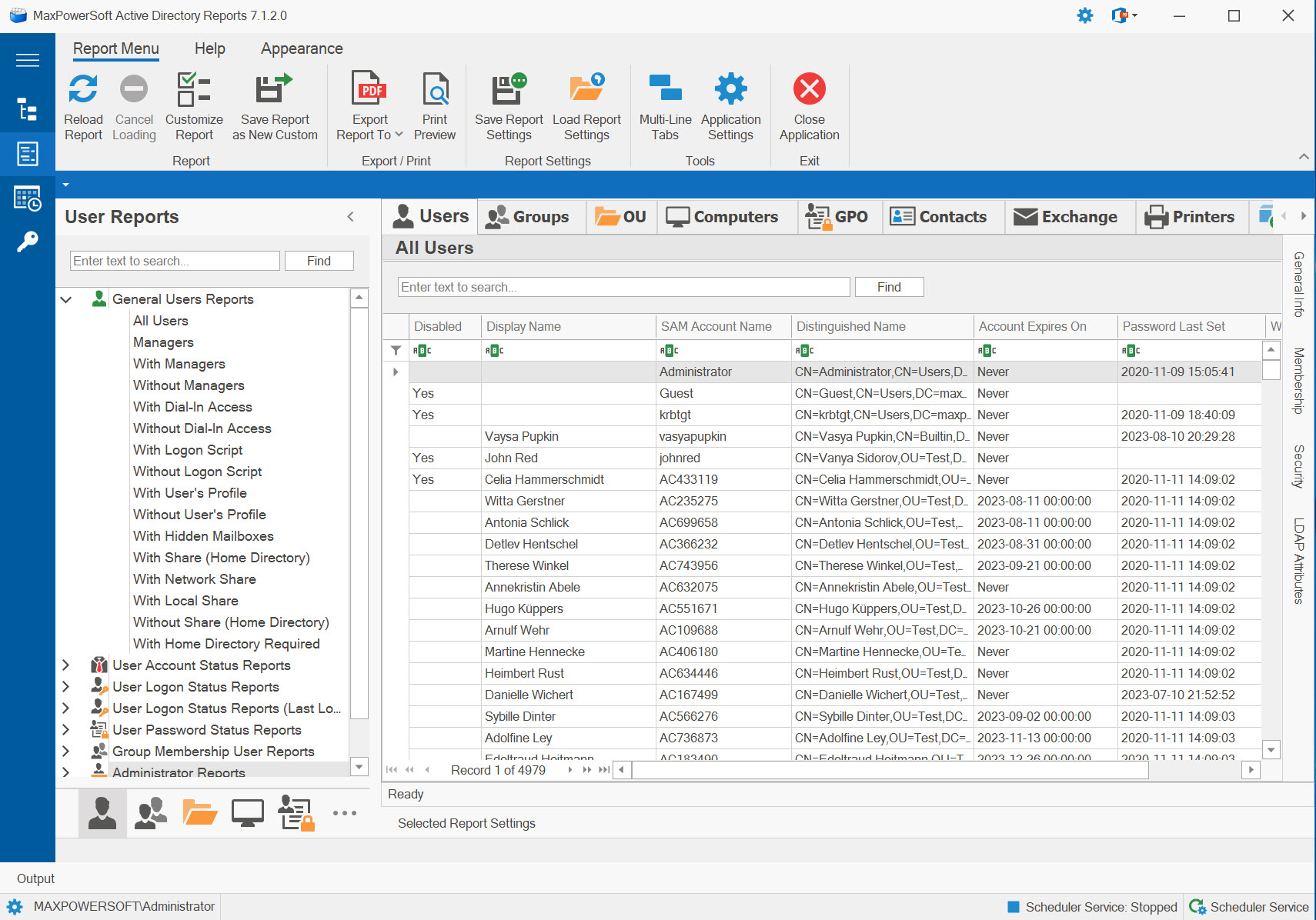
Available Reports
All Users Report
Retrieves a complete list of all user accounts in the selected domain, providing a comprehensive inventory of your entire user base without any filters applied.
Use Cases
- Create master inventory of all user accounts
- Audit total user count for licensing
- Export complete user directory
- Baseline report before applying filters
Key Information
- Display names and account names
- User Principal Names (UPN)
- Organizational Unit locations
- Email addresses
- Account creation dates
Managers Report
Identifies all users who have direct reports, providing a complete list of managers within your organization's hierarchy. Essential for organizational structure analysis and management chain visibility.
Use Cases
- Map organizational management structure
- Identify leadership roles
- Audit manager assignments
- Support HR organizational charts
Key Information
- Manager names and accounts
- Number of direct reports
- Department and title
- Contact information
- Organizational hierarchy level
With Managers Report
Lists all users who have an assigned manager in their Active Directory profile, showing the reporting relationships within your organization. Useful for verifying organizational structure completeness.
Use Cases
- Verify manager assignments
- Audit reporting relationships
- Support HR compliance
- Validate org chart accuracy
Key Information
- Employee names and accounts
- Assigned manager names
- Manager contact details
- Department associations
- Job titles
Without Managers Report
Identifies users who do not have an assigned manager in their AD profile. Critical for discovering incomplete organizational data and ensuring all employees have proper reporting relationships defined.
Use Cases
- Identify missing manager assignments
- Data quality auditing
- HR compliance verification
- Onboarding process validation
Key Information
- User accounts without managers
- Department assignments
- Job titles
- Account creation dates
- Last logon times
With Dial-In Access Report
Lists all users with remote dial-in access permissions enabled, allowing them to connect to the corporate network via Remote Access Service (RAS). Important for security auditing and VPN access management.
Use Cases
- Audit remote access permissions
- Security compliance reviews
- VPN user inventory
- Remote worker management
Key Information
- Users with dial-in enabled
- Account status
- Department and location
- Last logon information
- Remote access policy assignments
Without Dial-In Access Report
Shows all users who do not have dial-in access permissions, helping identify which users cannot connect remotely to the corporate network. Useful for managing access requests and planning remote work capabilities.
Use Cases
- Identify users needing remote access
- Plan VPN deployment
- Remote work readiness assessment
- Access request processing
Key Information
- Users without remote access
- Job roles and departments
- Work location (office/remote)
- Account status
- Contact information
With Logon Script Report
Lists users who have a logon script configured in their AD profile. Logon scripts automatically execute when users log in, mapping drives, setting configurations, or running automated tasks.
Use Cases
- Audit logon script assignments
- Migration planning (scripts to GPO)
- Troubleshoot login issues
- Standardize configurations
Key Information
- Assigned script names and paths
- User accounts with scripts
- Script locations on network
- Department groupings
- Last modified dates
Without Logon Script Report
Shows users who do not have any logon script assigned to their account. Useful for identifying users who may need scripts applied or confirming successful migration away from legacy logon scripts.
Use Cases
- Verify script migration completion
- Identify users needing scripts
- Confirm modern management adoption
- Troubleshoot missing configurations
Key Information
- Users without logon scripts
- Alternative configuration methods
- Department and OU placement
- Group Policy assignments
- Account creation dates
With User's Profile
Lists users who have a specified roaming profile path configured in their AD account. Roaming profiles allow users to maintain their desktop settings and files across different computers.
Use Cases
- Audit roaming profile configurations
- Profile storage capacity planning
- Identify profile path inconsistencies
- Migration planning for modern solutions
Key Information
- Profile path locations
- Server hosting profiles
- Profile versions (v2, v6)
- User accounts with profiles
- Last logon with profile
Without User's Profile
Shows users who do not have a roaming profile path configured, meaning they use local profiles on each computer they log into. Common in modern environments that have moved away from roaming profiles.
Use Cases
- Identify users with local profiles
- Verify modern profile strategy adoption
- Plan profile assignments
- Troubleshoot profile issues
Key Information
- Users without roaming profiles
- Workstation assignments
- Department and location
- Alternative solutions in use
- User work patterns
With Home Directory Required
Lists users who have the "Home Directory Required" flag set in their account properties, typically indicating organizational policy that mandates centralized storage for these users.
Use Cases
- Compliance verification
- Policy enforcement auditing
- Storage requirement tracking
- User provisioning validation
Key Information
- Users requiring home directories
- Current directory assignments
- Compliance status
- Department policies
- Exception handling
Related Reports
Explore other user report categories for additional insights:
See These Reports in Action
Try AD Reports free for 14 days — run any of these reports on your own Active Directory.
Download Free Trial View All Features