How to Exclude Domain Controllers from Scanning
In order to generate a report that includes non-replicated attributes, it is necessary to scan every domain controller within a specific domain to ensure accurate results.
However, there may be instances where you want to exclude certain domain controllers from the scanning process. With the help of our Active Directory Reports tool, you have the option to choose which domain controllers should be included in the scan.
When you navigate to the Forest tab and select a domain from the domain list, AD Reports will populate a list of all available domain controllers for the selected domain. By default, all domain controllers are automatically selected.
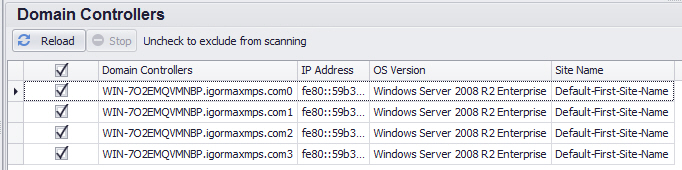
To exclude any recognized and available domain controllers from the scanning process, you can easily deselect them by removing the check mark next to their respective names in the Domain Controllers list.
In the event that AD Reports encounters difficulties reading the attributes of a specific domain controller, it will not appear in the Domain Controllers list for the current domain. An error message will be displayed in the logger window, indicating that this particular domain controller will be automatically excluded from future scans. This measure is implemented to enhance the performance of reports containing non-replicated attributes and to prevent delays and timeouts that may occur when attempting to retrieve data from unreachable domain controllers.