Active Directory & Azure Reporting Tool
Run complex SOX auditing reports for both on-premises AD and Azure Entra ID in as little as 2 clicks. 400+ predefined reports, compliance evidence packs for PCI-DSS, SOC 2, HIPAA and more, premium Azure security & activity reporting, hybrid identity gap analysis, and built-in scheduling with export to PDF, CSV, Excel, and more.
Full-featured trial — $50 discount on purchase


Fast · Accurate · Customizable · Cloud-Ready
Everything you need to audit, report, and manage your Active Directory and Azure Entra ID environment — in one tool.
Dated PDF or Excel evidence for any period — what ran, coverage against PCI-DSS, SOC 2, ISO 27001, HIPAA and NIST 800-53, and what changed.
Read the guide17 premium Entra ID reports — sign-in & audit logs, risky sign-ins, weak/no MFA, conditional access hygiene, and PIM activity, each labeled [P1] or [P2].
See the reportsSave any report as a baseline and compare it later — instant Added / Removed / Changed diff for every AD and Azure report.
Read the guideCross-reference on-prem AD with your Entra tenant — cloud-only admins, sync gaps, immutableID conflicts, and UPN mismatches.
Read the guideLive overview of your AD environment — password health, privileged accounts, security alerts, DC status, and Azure sync at a glance.
Read the guideUsers, Groups, OUs, Computers, GPOs, Contacts, Exchange, Printers, and NTFS permissions — run any report in seconds.
See the reportsCloud reporting with OData filters, Microsoft Graph API integration, and 42 Microsoft Entra ID properties to choose from.
Read the guideSchedule reports hourly, daily, weekly, or monthly. Background Windows service runs reports even when the app is closed.
Read the guideExport to PDF, CSV, TXT, XLS, RTF, and HTML. Customizable print preview, watermarks, headers, and email delivery.
Read the guideVisual query builders for both AD and Azure. Create complex filters without memorizing syntax.
Read the guideDirect groups, nested groups, primary groups, Foreign Security Principals — full membership visibility for users and groups.
Read the guideBatch auditing — 9 built-in profiles including PCI-DSS Quarterly and SOC 2 Annual, parallel execution, scheduling, and multi-sheet Excel export.
Read the guide6 free-tier reports: app registrations, expiring secrets/certificates, service principals, role assignments, license utilization.
Read the guideQuery all domain controllers to get the real last logon date — not just the replicated value. Includes True Locked Out status.
See the reportsAudit user permissions, group memberships, and security configurations to keep your environment compliant and secure.
See the reportsBuilt for IT Professionals
Powerful features designed to save you hours of manual work every week.
Compliance Evidence Pack New
Give your auditor dated evidence, not screenshots. One click on the Audit ribbon builds a PDF or Excel pack for any period: every scheduled report that ran and whether it was delivered, coverage against PCI-DSS, SOC 2, ISO 27001, HIPAA and NIST 800-53 — including the relevant reports that did not run — and what changed between runs, with space for a reviewer to sign. Ready-made PCI-DSS Quarterly and SOC 2 Annual audit profiles get you started.
Build a Compliance Evidence Pack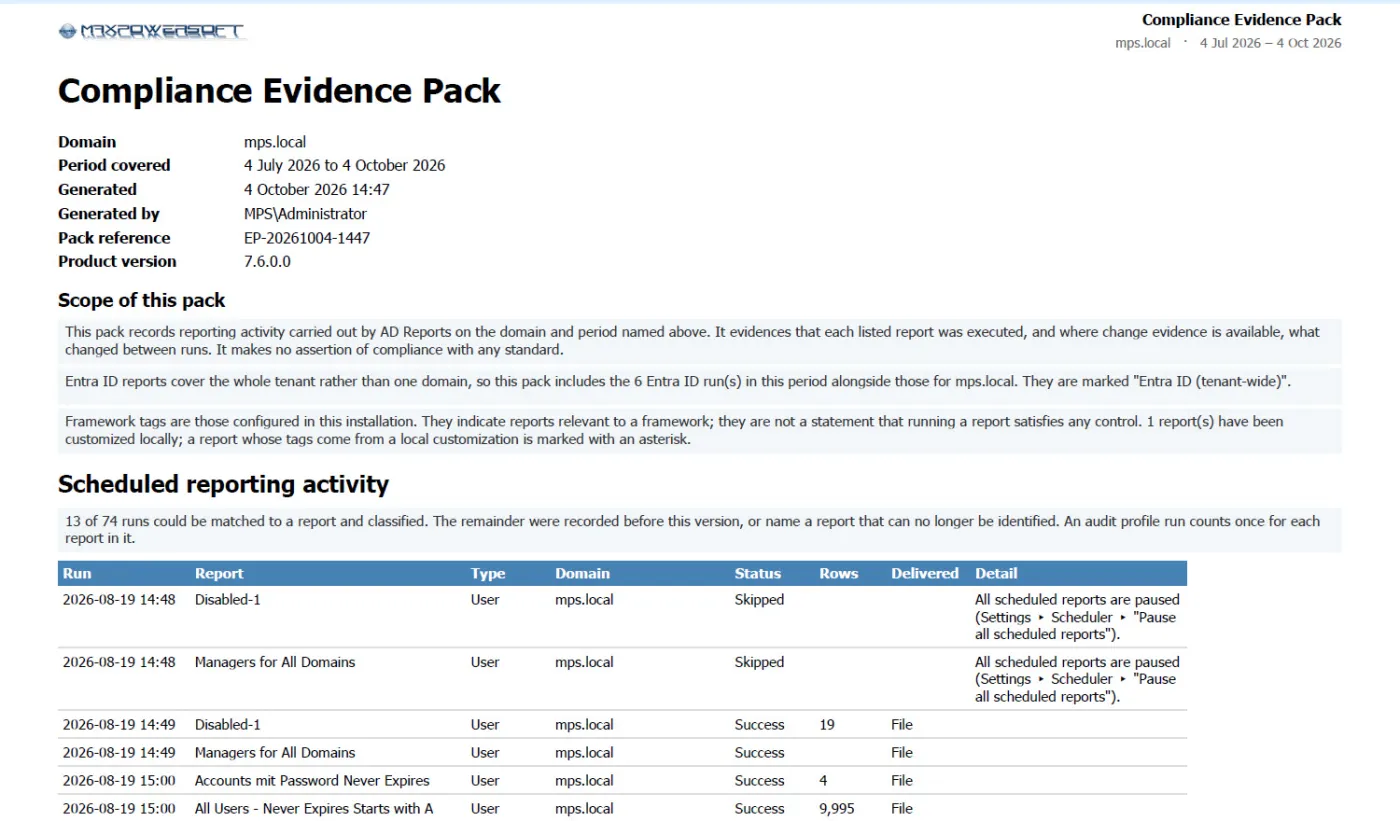
Azure Security & Activity Reports
Seventeen premium Microsoft Entra ID reports in one tab — sign-in and audit logs, risky sign-ins, legacy authentication, weak/no MFA, MFA enforcement coverage, conditional access hygiene, and full PIM eligibility, activity, and history. Each is labeled [P1] or [P2] so you know which license it needs, and premium consent is requested only when you run the report — your free-tier reports are never affected.
Azure Security & Activity Reports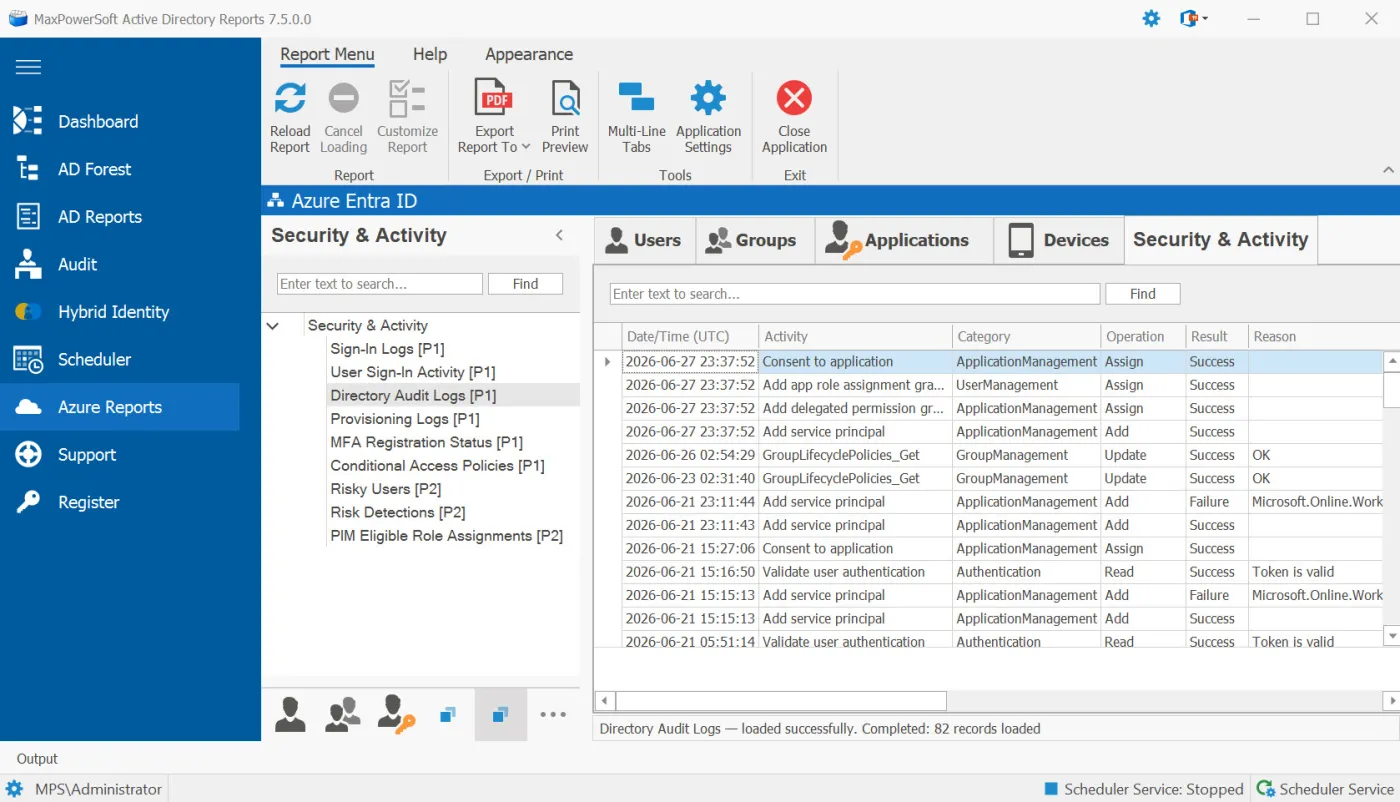
Report History & Compare
Save any AD or Azure report as a baseline and compare it later to see exactly what changed. The
new Diff tab shows three sub-tabs — Added, Removed, and
Changed — with side-by-side (was) and (now) columns.
Snapshots persist across restarts so you can compare today's results against last week, last
month, or your last security audit.

Hybrid Identity Gap Analysis
Cross-references your on-prem Active Directory with your Entra ID tenant and surfaces the mismatches. Six pre-built views: All Hybrid Users, Cloud-Only Privileged Admins, On-Prem Accounts NOT Syncing, UPN Suffix Mismatches, immutableID Conflicts, and Disabled On-Prem / Enabled in Entra. Color-coded match status, header summary counts, and timestamped CSV / Excel exports. Schedule any view for daily, weekly, or monthly email delivery.
Hybrid Identity Gap Analysis
Change-Aware Emails & Proactive Alerts
Scheduled reports can email what changed since the last run — an added / removed / changed summary with the full list attached as Excel. Set your own threshold alerts on locked-out accounts, stale accounts, expired passwords, and offline DCs, get a daily scheduler status email confirming every job ran, and an in-app license expiry reminder warns you before your license lapses.
Scheduling & Monitoring
Real-Time Dashboard
Get instant visibility into your Active Directory and Azure Entra ID health. The live dashboard surfaces key metrics — total users, locked-out accounts, expiring passwords, stale accounts, privileged users, security alerts, domain controller health, and Azure sync status — all in one place with auto-refresh and drill-down to the underlying reports.
Explore the Dashboard
400+ Predefined Reports
AD Reports offers a comprehensive collection of over 400 predefined reports, covering a wide range of Active Directory elements such as Users, Groups, Organizational Units, Computers, Group Policy Objects, Contacts, Exchange, Printers, and NTFS permissions. Customize any existing report or create entirely new reports from scratch and save them as custom reports.
Explore Report Library
Azure Entra ID Reporting
Extend your reporting capabilities to the cloud. Generate comprehensive reports for your Azure Entra ID users with pre-built reports including All Users, Enabled Users, Disabled Users, Admins, and Guest Users. Create custom reports with advanced OData filters compatible with Microsoft Graph API. Select from 42 Microsoft Entra ID properties organized by category.
Learn About Azure Reports
Azure Report Configuration Tool
Build powerful custom Azure reports with an intuitive visual interface. Select from 42 Azure AD properties organized into 9 categories. Create complex OData filters with a visual query builder that generates Microsoft Graph API-compatible syntax. Validate settings and preview API calls before running reports. The configuration summary provides performance estimates to optimize your queries.
Create Custom Azure Reports
Automated Report Scheduling
Automate your reporting workflow with the built-in scheduler. Schedule reports to generate and deliver automatically at specified intervals — hourly, daily, weekly, or monthly. Eliminate manual reporting tasks and ensure stakeholders receive timely updates. Works with both Active Directory and Azure reports.
How to Schedule Reports
Report Wizard & LDAP Query Builder
Create sophisticated custom reports without deep technical knowledge. The Report Wizard provides a user-friendly interface for querying Active Directory. Build complex LDAP queries visually without memorizing syntax. Start from any container or search the entire domain. Select search scope, LDAP attributes, membership settings, and more.
Use Report Wizard
True Last Logon & Advanced Attributes
Get accurate logon information by querying all domain controllers. "True Last Logon" represents the actual most recent logon event, accounting for replication delays. Access non-replicated attributes like lastLogon, badPasswordTime, badPwdCount, logonCount, and whenChanged. The "True Locked Out" report uses domain lockout policy for precise account status.
Logon Status Reports
Flexible Export & Print Options
Export reports to multiple formats including PDF, CSV, TXT, XLS, RTF, and HTML for seamless sharing and analysis. Customizable print preview lets you adjust layout, formatting, and content before printing. Apply watermarks, create custom headers and footers, and email reports directly in any format.
Export Options
Advanced Membership Analysis
Load comprehensive user membership information including direct groups, nested groups, and primary groups. View both security and distribution groups with customizable attribute loading. For groups, load members directly or include nested group members with Foreign Security Principal translation. Fully customizable to meet your audit and compliance requirements.
User Membership Group Members
Audit Module & Compliance Profiles
A dedicated page with master/detail layout, 9 built-in profiles (including PCI-DSS Quarterly, SOC 2 Annual and Kerberos Attack Surface), parallel execution of up to 4 reports at once, and the ability to schedule any profile for unattended delivery with multi-sheet Excel export and HTML email summary.
How to Use the Audit Module
Azure Applications & Access Reports
Six new free-tier reports for auditing your Microsoft Entra ID applications. List all app registrations, find expiring secrets and certificates, audit service principals and role assignments, and review license utilization — no P1/P2 license required.
Azure Applications & Access Reports
Additional Powerful Features
Inventory every device in your Entra tenant — all, enabled, disabled, or stale (90 days) — plus stale guest-user cleanup. Free tier, no P1/P2.
See the reportsRight-click any report to pin it to a per-domain ★ Favorites group at the top of the tree — your daily set, one click away.
Read the guideGet an email the moment a scheduled job fails, plus a daily scheduler status digest so you know every job ran — without logging into the server.
Read the guideSave report settings for specific domains or all domains in the forest. Full multi-forest scanning capabilities.
Read the guideChoose which domain controllers to scan for optimized performance and targeted reporting.
Read the guideSingle-click access to comprehensive AD object details, attributes, and properties.
Read the guideBackground Windows service for fully automated report generation without user interaction.
Read the guideSecure Microsoft Graph API authentication with token management and automatic refresh.
Read the guideVisual builder for Azure reports — generates Microsoft Graph API-compatible filter syntax.
Read the guideWhat Our Customers Say
Trusted by IT professionals worldwide for reliable Active Directory and Azure reporting.
“Part of my duties is to generate SOX reports, a long and tedious process. I finally found MaxPowersoft's AD Reports. Downloaded the trial, and saw that with a few clicks I could condense a lot of work down to a few mouse clicks. Saves me a lot of time, and a lot of headaches.”
“Thanks for replying on a Sunday night. The registration key worked like a treat; we are back up and running. I like the new interface. Thanks for your help and all the good work.”
“First I have to say wow, great piece of software. That is exactly the kind of a reporting tool which we have searched for. Thank you for the help.”
Built for Every IT Role
From daily administration to annual compliance audits, AD Reports has you covered.
Audit user accounts, group memberships, and computer objects across your entire forest in seconds.
Identify stale accounts, excessive permissions, and suspicious changes to strengthen your security posture.
Generate SOX, HIPAA, and regulatory audit reports on demand with scheduled delivery and multi-format export.
Manage and report across multiple client domains efficiently with automated scheduling and centralized reporting.
Ready to Transform Your AD & Azure Reporting?
Start your free 14-day trial today. No credit card required. Full-featured trial with $50 discount on purchase.