Get Email Alerts When Scheduled Jobs Fail
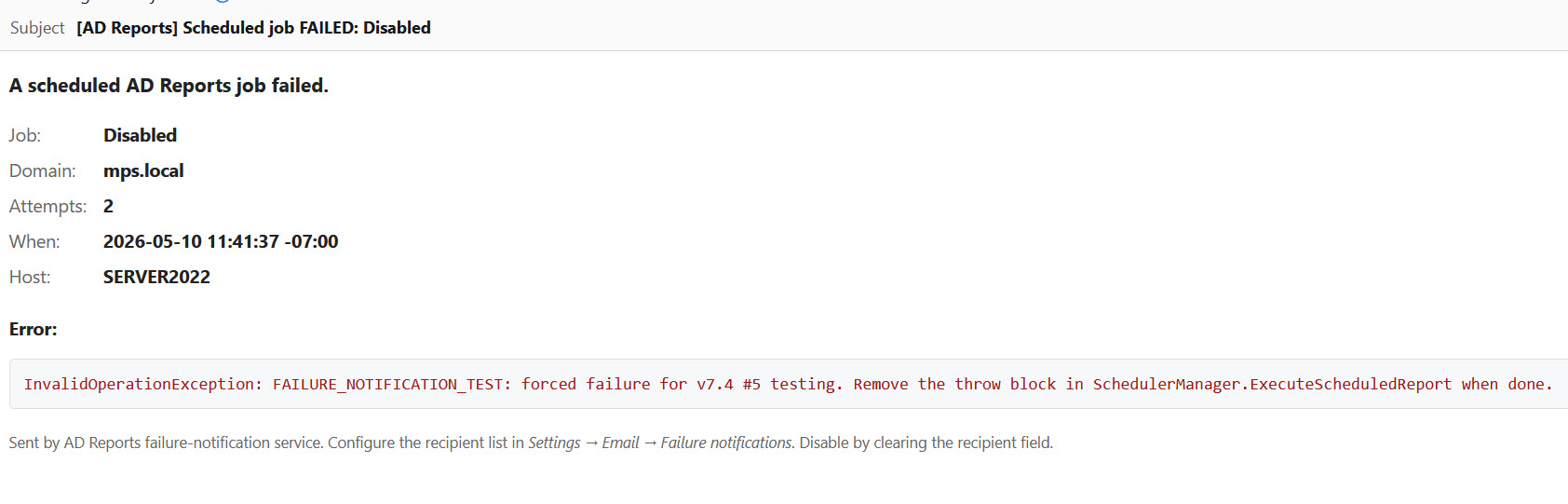
Closes the "did my 3am scheduled job fail?" blind spot. Add one or more recipients to the Failure notifications to: field in Settings → Email, and any time a scheduled report, audit profile, or Hybrid Identity job exhausts its retries and still fails, an alert email lands within seconds — with the failed job name, target domain, attempt count, exact error, host machine, and timestamp.
Set Failure Notification Recipients
Open Settings → Email. Below the existing Send test e-mail to: field you'll see a new Failure notifications to: field.
Enter one or more recipient email addresses, separated by commas or semicolons. Leave the field blank to keep current behavior (no failure alerts).

oncall@example.com or your PagerDuty / Opsgenie email integration).
What Triggers a Failure Alert
An alert is sent only on real failures:
- The job exhausted all retry attempts (one retry by default, 30s delay)
- The final attempt still failed — a clear error from AD, Graph API, the export library, or the email transport
Alerts are NOT sent for:
- Partial jobs (the report ran successfully but only the result email failed to deliver) — that case is already visible in Job History as Partial; you don't need a second email.
- Empty-result jobs — a successful run that returned zero rows is success, not failure.
- Cancelled jobs.
What's in the Alert Email
Each failure email contains:
- Failed job name — report, audit profile, or Hybrid Identity gap-type
- Target domain the job was running against
- Number of attempts (e.g., 3 of 3)
- Exact error message — the actual exception text from AD, Graph API, or the export pipeline
- Host machine name — which workstation or server ran the job (matters when both UI scheduler and Windows Service are in play)
- Timestamp of the final attempt
Works With Any Email Transport
Failure alerts go through the same email pipeline as your scheduled report emails — no separate configuration:
- SMTP with username / password (DPAPI-encrypted at rest)
- Gmail OAuth (15-second token timeout prevents hanging)
- Microsoft OAuth — in unattended scenarios this is silent-only (won't pop a browser)
See Email Settings for transport setup details.
Best-Effort Delivery
If the failure email itself can't be delivered — e.g., the SMTP server is also down — the event is logged but it does NOT blow up the scheduler. Your other scheduled jobs keep running. You'll see the suppressed alert in the AD Reports diagnostics log.
Common Use Cases
- Daily Disabled Users report at 3am → DC was unreachable. Wake up to a clear "Disabled Users — failed (3 attempts) — DC02 unreachable" email instead of finding empty Job History at 9am.
- Weekly Security Audit profile → Azure AD throttled mid-run. See the actual Graph API error and re-run before the security review meeting.
- Monthly Hybrid Identity job → AD Connect was paused. Get alerted on the same business day instead of next month.