Password Health (FGPP) Reports
6 ReportsAbout Password Health (FGPP) Reports
Password Health (FGPP) Reports evaluate password expiration based on the effective Fine-Grained Password Policy applied to each user, rather than relying solely on the Default Domain Policy. This is essential for environments where different user groups have different password policies (e.g., stricter rules for administrators, relaxed rules for service accounts).
Reports based on each user's effective password policy
Correct expiration dates reflecting FGPP max age settings
Identify non-compliant accounts per policy
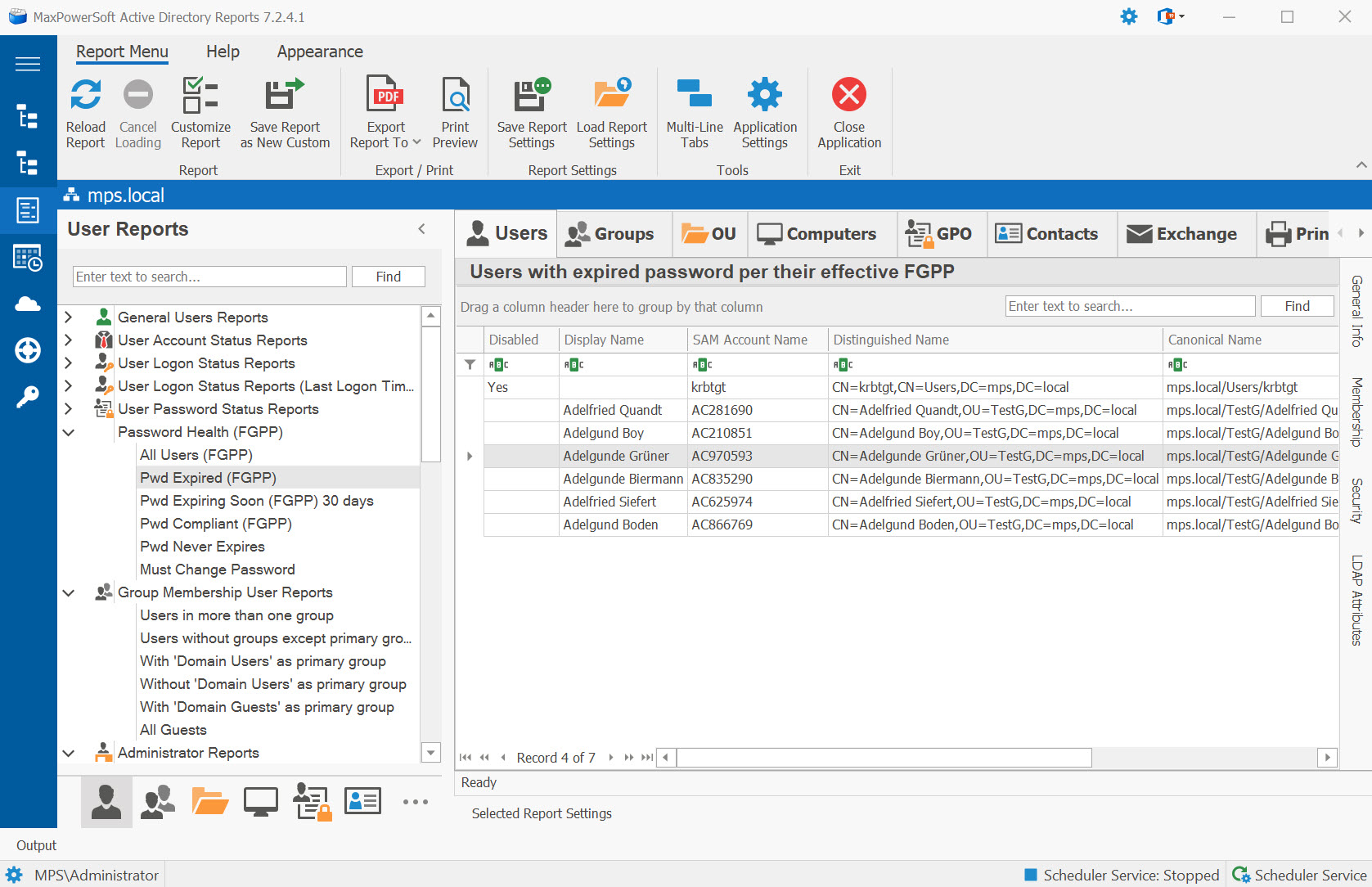
Example: Password Health (FGPP) Reports
Available Reports
All Users (FGPP)
Lists all user accounts with their effective Fine-Grained Password Policy and current password health status. Provides a complete overview of password compliance across all FGPP-affected users.
Use Cases
- Full password health audit with FGPP awareness
- Identify which policy applies to each user
- Compare compliance across different policies
- Baseline reporting for password governance
Key Information
- Effective password policy name
- Password health status (Compliant, Expired, etc.)
- Password expiration date
- Last password change
- Policy maximum password age
Pwd Expired (FGPP)
Shows accounts with expired passwords based on their effective Fine-Grained Password Policy. Unlike standard password expiration reports, this report correctly calculates expiration using each user's FGPP maximum password age setting.
Use Cases
- Identify accounts expired under FGPP rules
- Priority remediation for FGPP-covered users
- Accurate expiration tracking for privileged accounts
- Compliance reporting per password policy
Key Information
- Expiration date based on effective FGPP
- Days since expiration
- Effective policy name and max age
- Last password change date
- User contact information
Pwd Expiring Soon (FGPP) 30 days
Lists accounts with passwords expiring within the next 30 days, calculated using each user's effective Fine-Grained Password Policy maximum password age.
Use Cases
- Proactive FGPP-aware expiration notifications
- Prevent lockouts for policy-specific users
- Help desk planning with accurate expiration data
- Targeted user communication campaigns
Key Information
- Exact expiration date per FGPP
- Days remaining until expiration
- Effective policy name
- User contact information
- Last password set date
Pwd Compliant (FGPP)
Shows accounts with valid, non-expired passwords that are compliant with their effective Fine-Grained Password Policy.
Use Cases
- Measure overall FGPP compliance rate
- Verify policy effectiveness
- Compliance reporting for auditors
- Track improvement over time
Key Information
- Compliant account details
- Effective policy name
- Password age and expiration date
- Days until next expiration
- Policy max age setting
Pwd Never Expires
Lists accounts with the "Password Never Expires" flag set, evaluated in the context of Fine-Grained Password Policies. These accounts bypass password expiration regardless of the FGPP maximum password age setting.
Use Cases
- Audit non-expiring accounts under FGPP
- Identify service accounts and exceptions
- Security compliance review
- Policy violation detection
Key Information
- Non-expiring account details
- Effective FGPP policy name
- Account type (user/service)
- Last password change
- Password age
Must Change Password
Lists accounts flagged for mandatory password change at next logon, shown in the context of their effective Fine-Grained Password Policy.
Use Cases
- Track forced password resets per policy
- New user account verification
- Security incident remediation tracking
- Onboarding workflow validation
Key Information
- Forced change status
- Effective FGPP policy name
- Account creation date
- Last logon attempt
- Set by administrator
Related Reports
Explore other user report categories:
See These Reports in Action
Try AD Reports free for 14 days — run any of these reports on your own Active Directory.
Download Free Trial View All Features