User Platform Readiness Reports
5 ReportsAbout Platform Readiness for Accounts New in 7.6.3
The Platform Readiness folder under Users holds three checks for Microsoft's 2026 Kerberos changes — which accounts may have no AES keys, which service accounts domain controllers now give AES-only tickets, and which accounts are allowed only RC4 or DES — a check of who can create or change a Windows Server 2025 delegated managed service account (dMSA), and the list of dMSAs. Users, computers and managed service accounts are checked.
Each check says Pass or Fail like a security finding, with its severity, why it matters, how to fix it and Microsoft's documentation. The built-in audit profile Platform Readiness runs these with the computer checks and Use DES Encryption, and run again shows what was fixed, what is still open and what is new.
Accounts Microsoft's 2026 Kerberos changes affect
Who could aim a dMSA at an account
What was fixed, what is still open, what is new
Example: User Platform Readiness Reports in AD Reports
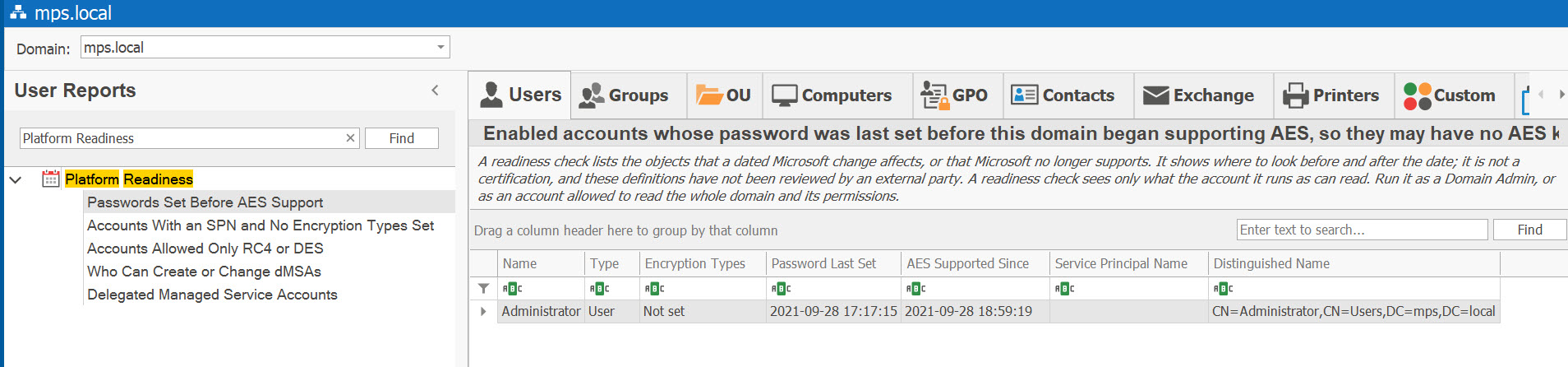
Available Reports
Passwords Set Before AES Support New in 7.6.3
Severity: High
Enabled accounts whose password was last set before this domain began supporting AES, so they may have no AES keys — users, computers and managed service accounts, with or without an SPN, oldest first. The day AES began is read from the domain itself (when its functional level reached Windows Server 2008) and shown to the second in the AES Supported Since column; “On or before” means the level changed more than once since. Accounts that must change their password at next logon are counted on the status line, not listed. Columns: Name, Type, Encryption Types, Password Last Set, AES Supported Since, Service Principal Name, Distinguished Name.
Why It Matters
AES keys are created when a password is set, so an account unchanged since the domain began supporting AES has none, and RC4 is used. Since Microsoft's April 2026 update, domain controllers refuse tickets for such a service account when its encryption types are not set (event 204) or set to AES only (event 209). Migration tools that copy only the password hash may leave no AES keys whatever the date. The check assumes domain controllers keep Microsoft's default for accounts without encryption types.
How to Fix
Change the password, which creates the AES keys — change it in the service that uses the account too, or move the service to a gMSA. Disable accounts nobody uses. Only as a last resort, allow RC4 for the account and plan to remove it.
Microsoft Support: KB5073381 · Microsoft Learn: Detect and Remediate RC4 Usage in Kerberos
Accounts With an SPN and No Encryption Types Set New in 7.6.3
Severity: Medium
Enabled accounts with a service principal name whose Kerberos encryption types are not set, so domain controllers give them AES-only tickets since April 2026. Domain controllers, krbtgt and trust accounts are not listed. Columns: Name, Type, Operating System, Service Principal Name, Password Last Set, Distinguished Name.
Why It Matters
Since April 2026 domain controllers assume AES only for accounts whose types are not set, so services with RC4-only keytabs, and RC4-only devices, fail. Windows computers record their own types when they restart, so a computer listed here is usually non-Windows, old, or not restarted since it joined. An account also listed in Passwords Set Before AES Support has its tickets refused already.
How to Fix
Confirm the service supports AES and re-export its keytab with AES keys, then set the types: for a user, check This account supports Kerberos AES 128 bit encryption and … AES 256 bit encryption; a Windows computer takes them from the Network security: Configure encryption types allowed for Kerberos policy. For an RC4-only device, ask the vendor; as a last resort, value 0x24 (RC4 tickets with AES session keys), and plan to remove it.
Microsoft Support: KB5073381 · Microsoft Learn: Detect and Remediate RC4 Usage in Kerberos
Accounts Allowed Only RC4 or DES New in 7.6.3
Severity: Medium
Enabled accounts whose Kerberos encryption types allow RC4 or DES and neither AES type (trust accounts and krbtgt left out). Columns: Name, Type, Encryption Types, Service Principal Name, Password Last Set, Distinguished Name.
Why It Matters
Domain controllers honour the types set, so these accounts' tickets use RC4 or DES and can be Kerberoasted, and Windows Server 2025 domain controllers issue no RC4 ticket-granting tickets, so RC4-only accounts cannot sign in with Kerberos through them. Accounts with Use only Kerberos DES encryption types for this account checked are in the Use DES Encryption report.
How to Fix
Confirm the account's service supports AES and set the types — the two AES options, or the computer's Kerberos policy. If the account is also in Passwords Set Before AES Support, change its password too. Keep RC4 only for a device that cannot do otherwise, and plan its replacement.
Microsoft Learn: Detect and Remediate RC4 Usage in Kerberos · Microsoft Support: KB5073381
Who Can Create or Change dMSAs New in 7.6.3
Severity: High
Accounts beyond the Windows defaults that can create a delegated managed service account (dMSA) in the domain, an OU or a container, or change an existing one — Full Control, changing permissions or the owner, creating child objects or dMSAs, or writing a dMSA's link to the account it supersedes. Windows' own delegations (on its own containers, and Account Operators' rights anywhere) are listed only while their group holds an account beyond the administrators. The status line says whether the forest's schema has the dMSA class yet and how many domain controllers run Windows Server 2025. Columns: Granted To, Right, Object, Applies To, Inherited, Reaches, Distinguished Name.
Why It Matters
A dMSA, new in Windows Server 2025, can supersede an account and then has all of that account's access. Whoever can create a dMSA, or write an existing one's link, can aim it at an account — including a Domain Admin (Microsoft's CVE-2025-53779, August 2025). A dMSA works only with a domain controller running Windows Server 2025 and that version's schema; without the class nobody can create one yet, but the holders listed could once it is added.
How to Fix
Remove the entry, or narrow it to the object types needed, in Active Directory Users and Computers under Advanced Security; on an existing dMSA let only Domain Admins write. Review the members of the Windows groups listed (Group Policy Creator Owners, Account Operators), and keep every Windows Server 2025 domain controller on the August 12, 2025 updates or later.
Microsoft Learn: dMSA overview · Microsoft Learn: Setting up dMSA · Microsoft Security Response Center: CVE-2025-53779
Delegated Managed Service Accounts New in 7.6.3
Every delegated managed service account (dMSA), with the account it supersedes: its migration state (Migration begun, Migration completed or Standalone), whether the superseded account is enabled and privileged, and whether its link back names the dMSA. An inventory, not a check — it has no Pass or Fail. Columns: Name, State, Supersedes, Superseded Account Enabled, Superseded Account Privileged, Linked Back, Created, Distinguished Name.
See These Reports in Action
Try AD Reports free for 14 days — run any of these reports on your own Active Directory.
Download Free Trial View All Features