Security Findings Reports
12 ReportsAbout Security Findings New in 7.6.3
Each report in the Security Findings folder under Users lists the accounts and objects that match a known Active Directory attack pattern, from the Five Eyes guide Detecting and mitigating Active Directory compromises, MITRE ATT&CK and DISA's Active Directory Domain STIG. An empty report means nothing matched, so the finding passes; a report that cannot read what it needs fails and says why, so a missing permission never looks like a clean result. They run, export and schedule like any other report, and can be added to audit profiles.
Each one says Pass or Fail: the AD Reports page's status line ends “Fail: 2 objects match” or “Pass: nothing matches”, the Audit page's tab reads “[High] Kerberoastable Privileged Accounts - Fail (2)”, the audit workbook adds why it matters and how to fix it, and the Compliance Evidence Pack shows each finding's latest result. The built-in audit profiles Five Eyes AD Compromise (11 findings, checking 9 of the guide's 18 techniques) and Pentest Re-check (all twelve, with Users with SPNs and Pwd Never Expires) run them, and say what was fixed since the last run.
With severity, on the Audit page and in the Evidence Pack
What each finding means and what to change
What was fixed, what is still open, what is new
Example: Security Findings Reports in AD Reports
Available Reports
Replication (DCSync) Rights Beyond the Defaults New in 7.6.3
Severity: Critical
Accounts beyond the Windows defaults that can read password data from the domain by replication (DCSync): non-default holders of Full Control, All extended rights or Replicating Directory Changes All on the domain. A group is listed as the group, with how many accounts it reaches. The whole domain is read, whatever the search root. Columns: Holder, Type, Right, Inherited, Reaches, Distinguished Name.
Why It Matters
Anyone holding these rights can ask a domain controller for every account's password hash, krbtgt included, from any computer. Only domain controllers need them. Entra Connect's MSOL_ account holds one for password hash sync, which makes that account and its server as sensitive as a Domain Admin.
How to Fix
Find what created the entry and, if nothing needs it, remove it (Active Directory Users and Computers with Advanced Features: the domain's Properties → Security → Advanced). Keep Entra Connect's entry and protect its account and server as Tier 0; an account that keeps the right should hold no SPN and sign in only to Tier 0 systems.
Five Eyes guide: DCSync · Five Eyes guide: Microsoft Entra Connect Compromise · MITRE ATT&CK T1003.006
Dangerous Rights on Tier 0 Objects New in 7.6.3
Severity: Critical
Accounts beyond the Windows defaults that can take control of the domain's most privileged objects — the domain, AdminSDHolder, the Domain Controllers OU, krbtgt, the Administrators, Domain Admins, Enterprise Admins and Schema Admins groups, each domain controller and each privileged account — through Full Control, changing permissions or the owner, writing all properties, all extended rights, adding members, resetting a password or writing key credentials; a non-default owner is listed too. Columns: Object, Object Type, Holder, Holder Type, Right, Inherited, Reaches, Object Path, Distinguished Name.
Why It Matters
These rights let the holder take over a Domain Admin account or group, or a domain controller. The owner can always change permissions. AdminSDHolder's permissions are copied onto every protected account and group about once an hour.
How to Fix
Remove the entry, or make Domain Admins the owner. On a protected object, an entry AdminSDHolder also holds must be removed there, or it is copied back within the hour; one AdminSDHolder does not hold was added recently — find out who added it. Remove inherited entries where they are set. People who manage these objects belong in the built-in admin groups.
MITRE ATT&CK T1098 · MITRE ATT&CK T1098.007 · Five Eyes guide: Shadow Credentials
Kerberoastable Privileged Accounts New in 7.6.3
Severity: High
Privileged accounts with a service principal name, whose password any domain user can try to crack offline: enabled members — direct, nested or by primary group — of Administrators, Domain Admins, Enterprise Admins or Schema Admins with an SPN set. Columns: the standard user columns (Disabled, Display Name, SAM Account Name, Distinguished Name, Canonical Name, Account Expires On, Password Last Set, When Created) and Service Principal Name.
Why It Matters
Any domain user can request a Kerberos service ticket for an account that has a service principal name (SPN), and try to crack the account's password from it offline. No failed sign-in is recorded and no lockout applies. When the account is privileged, a cracked password gives away the domain.
How to Fix
Remove the SPN if nothing uses it; otherwise use a group managed service account (gMSA). Failing that, take the account out of the privileged groups, give it a unique password of at least 30 characters and enable AES. The Password Last Set column shows how long the current password has been exposed.
AS-REP Roastable Accounts New in 7.6.3
Severity: Medium
Enabled accounts that do not require Kerberos pre-authentication. Columns: the standard user columns (Disabled, Display Name, SAM Account Name, Distinguished Name, Canonical Name, Account Expires On, Password Last Set, When Created).
Why It Matters
An account that does not require Kerberos pre-authentication answers anyone on the network who asks with data encrypted with its password. That data can be cracked offline without any failed sign-in. The setting exists only for old systems that cannot use pre-authentication.
How to Fix
Clear Do not require Kerberos preauthentication on the account's Account tab. If an old system truly needs it, keep the account out of privileged groups, and give it a unique password of at least 30 characters for a service account, or 15 for a person.
Unconstrained Delegation Outside Domain Controllers New in 7.6.3
Severity: High
Computers and accounts other than domain controllers that are trusted for delegation to any service — enabled users and computers, writable domain controllers left out. Columns: the standard user columns (Disabled, Display Name, SAM Account Name, Distinguished Name, Canonical Name, Account Expires On, Password Last Set, When Created).
Why It Matters
A computer or account trusted for delegation to any service keeps a copy of the ticket-granting ticket of every user who connects to it, and whoever controls it can reuse them. An attacker can make a domain controller connect to it, which hands over the domain controller's ticket and the domain.
How to Fix
Replace Trust this computer for delegation to any service (Kerberos only) with delegation to specific services, or none — the Five Eyes guide recommends resource-based constrained delegation; until then, treat the computer as a Tier 0 server. Mark privileged accounts sensitive (see Privileged Accounts That Can Be Delegated) and disable the Print Spooler service on domain controllers.
Privileged Accounts That Can Be Delegated New in 7.6.3
Severity: High
Privileged accounts that are neither marked sensitive nor members of Protected Users: enabled admin-group members without Account is sensitive and cannot be delegated, minus the members of Protected Users (nested membership included). Columns: the standard user columns (Disabled, Display Name, SAM Account Name, Distinguished Name, Canonical Name, Account Expires On, Password Last Set, When Created).
Why It Matters
Any server trusted for delegation can pass on these accounts' tickets, so a compromised server can act as a Domain Admin who connects to it.
How to Fix
Check Account is sensitive and cannot be delegated on each account. Protected Users protects further, but test it first: its members cannot use NTLM, RC4 or delegation, their sign-ins last four hours, and Microsoft says never to add service or computer accounts to it.
Privileged SIDs in SID History New in 7.6.3
Severity: High
Accounts and groups whose SID history holds the SID of a privileged account or group — Administrator, Domain Admins, Domain Controllers, Schema Admins, Enterprise Admins and the key admin groups of any domain, or the built-in Administrators, Account Operators, Server Operators, Print Operators and Backup Operators. Columns: Account, SAM Account Name, Type, Enabled, SID in History, Privileged As, Own Domain, Distinguished Name.
Why It Matters
SIDs in SID history are added to the account's access when it signs in, so a privileged SID acts as membership without appearing in the group. Outside a migration still in progress there is no reason for one; a SID of the account's own domain is a strong sign of tampering.
How to Fix
Check whether a migration is in progress. Otherwise remove the value — Set-ADUser, Set-ADGroup or Set-ADComputer with -Remove @{sIDHistory='S-1-...'} — and find out how it was written. Keep SID filtering on for domain and forest trusts.
Five Eyes guide: SID History compromise · MITRE ATT&CK T1134.005
KRBTGT Password Older Than a Year New in 7.6.3
Severity: Medium
The domain's krbtgt account, when its password has not been changed for more than a year (365 days). The report fails, saying so, when krbtgt is not in its search root. Columns: the standard user columns (Disabled, Display Name, SAM Account Name, Distinguished Name, Canonical Name, Account Expires On, Password Last Set, When Created).
Why It Matters
The krbtgt key protects every Kerberos ticket. Anyone who ever obtained it — through DCSync, a copy of the directory database or a domain controller backup — can forge a ticket for any account (a Golden Ticket) until the password has been changed twice.
How to Fix
Reset it twice: before the second reset, let the first replicate to every domain controller and wait at least the maximum ticket lifetime (10 hours by default). Use a tested script such as Microsoft's New-KrbtgtKeys.ps1. Then change it at least every 12 months, and at once when a compromise is suspected.
Anonymous Access Through Pre-Windows 2000 Compatible Access New in 7.6.3
Severity: High
Anonymous Logon or Everyone in the Pre-Windows 2000 Compatible Access group, directly or through nested groups (Authenticated Users is not listed). The whole domain is read. Columns: Group, Member, SID, How, Path, Distinguished Name.
Why It Matters
Members of this group can read every user and group; it exists for Windows NT 4.0 and earlier. With Anonymous Logon or Everyone in it, connections made without any account can read them too, which helps an attacker choose targets.
How to Fix
Remove Anonymous Logon and Everyone from the group (Active Directory Users and Computers, Builtin container) and keep Authenticated Users. First check that no Windows NT-era system relies on anonymous access.
DISA Active Directory Domain STIG: V-243486 · MITRE ATT&CK T1087.002
Users Can Add Computers to the Domain New in 7.6.3
Severity: Medium
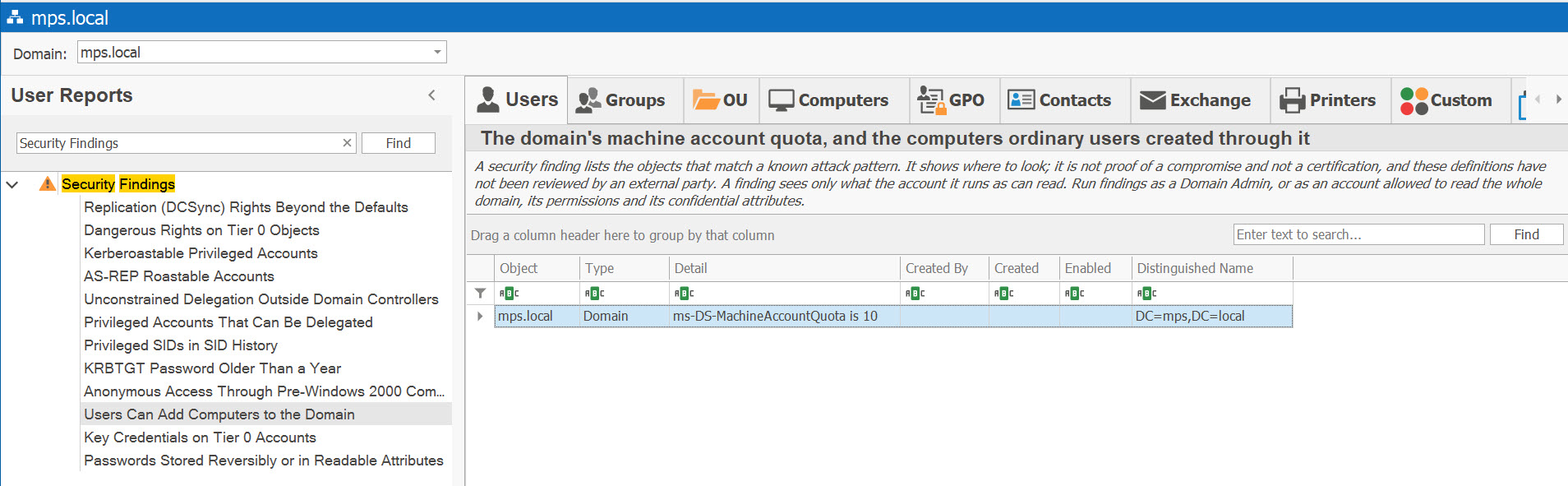
The domain's machine account quota, and the computers ordinary users created through it: a Domain row when the quota is above 0, and a Computer row, with who created it, for each computer in the search root created through the quota. Columns: Object, Type, Detail, Created By, Created, Enabled, Distinguished Name.
Why It Matters
By default any domain user can create up to 10 computer accounts (ms-DS-MachineAccountQuota). A computer account an attacker creates is a full domain account they control, and a common first step towards taking over other computers or the domain.
How to Fix
Set the quota to 0 — Set-ADDomain -Identity <domain> -Replace @{'ms-DS-MachineAccountQuota'=0} — and delegate creating computer objects on an OU to the people who join computers. Review the computers listed and who created them, and make sure Domain Computers is not in a privileged group.
Key Credentials on Tier 0 Accounts New in 7.6.3
Severity: High
Privileged accounts and domain controllers that carry a key credential (msDS-KeyCredentialLink). The key data itself is never shown. Columns: the standard user columns (Disabled, Display Name, SAM Account Name, Distinguished Name, Canonical Name, Account Expires On, Password Last Set, When Created).
Why It Matters
A key credential lets whoever holds the private key sign in with a certificate, and it survives a password change. Windows Hello for Business adds keys legitimately; an unregistered key on an admin account or a domain controller may have been planted (Shadow Credentials).
How to Fix
Find which device registered each key and remove the keys nobody can account for — clearing msDS-KeyCredentialLink removes them all. Limit who can write the attribute to Domain Admins, Key Admins, Enterprise Key Admins and deliberate delegations (see Dangerous Rights on Tier 0 Objects).
Passwords Stored Reversibly or in Readable Attributes New in 7.6.3
Severity: High
User accounts whose password is stored with reversible encryption, or with userPassword or unixUserPassword set. Only the presence of either attribute is tested — neither is ever read. Columns: the standard user columns (Disabled, Display Name, SAM Account Name, Distinguished Name, Canonical Name, Account Expires On, Password Last Set, When Created).
Why It Matters
Reversible encryption keeps a copy that turns back into the password, readable by anyone with the directory database or a DCSync. userPassword is an ordinary attribute unless the forest treats it as the password, so an old tool's value may be plain text others can read; unixUserPassword likewise.
How to Fix
Clear Store password using reversible encryption, then change the password — the reversible copy stays until the next change. Clear userPassword and unixUserPassword, and change the password.
See These Reports in Action
Try AD Reports free for 14 days — run any of these reports on your own Active Directory.
Download Free Trial View All Features